
For clubs, schools and organisations
Update your calendar once. Keep everyone up to date.
Keep your organisation’s important dates in one place. Put it on your website, share it with members and families, and let people follow the dates that matter to them.
Publisher Free
- A$0 No time limit
- 1 person to manage your calendars
- Up to 3 organisation calendars
- Followers don’t count towards your plan
Sign up with your email address. No payment details needed.
Sound familiar?
Stop updating the same schedule everywhere.
If people keep asking when the next game, class, meeting or event is, your dates probably live in several places at once: the website, emails and newsletters, Facebook, team chats and printed notices. When a time or venue changes, every copy has to change too, and the one nobody updated is the one someone reads.
Without Calee
- Change the fixture
- Update the website
- Send an email
- Post on social media
- Message the team chat
- Hope everyone sees the latest version
With Calee
- Change the event once, in your calendar
- Your published calendar shows the new details
- People following it see the revised event when their calendar refreshes, without anyone retyping it
Same-day cancellations and other urgent changes still belong on your usual direct channel. Calee is not an emergency alert system.
How it works
From your calendar to everyone who needs it
-
Create or bring in your calendars
Start free and verify your email address to open your organisation’s Calee Business workspace. Then create calendars for what people follow: the club, a team, school dates, classes, programs, meetings or events. Already have your dates somewhere?
-
Share them where people already look
Put a calendar on your organisation’s website, or share its link in an email, newsletter, team chat or QR code.
-
Let people follow the calendars they need
Each person chooses what applies to them. They can view your calendar on the web, follow it in the Calee app, or add it to the calendar app they already use.
-
Update once when something changes
Change the date, time or venue in your calendar. People following it see the revised event when their calendar refreshes, so no one has to copy it across.
Getting started
Already have your dates somewhere else?
You don’t necessarily need to rebuild your schedule from scratch.
Connect a calendar you already keep
If your dates are in Google Calendar, Outlook, Apple iCloud or another system that offers a compatible calendar link, you may be able to connect it to Calee. Connected calendars are read-only in Calee, so you keep making changes where you make them now. Not every system offers a live link.
Bring events across from a file
Have a calendar file ending in .ics? Importing copies those events into Calee once, so you can manage them there. It doesn’t create a live connection to the original calendar.
Where people see it
Your calendar, wherever people already look
-
Your website
Where your website supports embedded calendars, show the schedule on your own site, exactly as you publish it.
-
A shared link
Send one link by email, message or newsletter, or share it as a QR code. A public link can be forwarded, so use it for dates you’re happy to share.
-
The Calee app
Families and members can keep your calendar beside the rest of their week in the free Calee app.
-
Their own calendar app
People can subscribe in a compatible calendar app they already use, such as Google Calendar, Apple Calendar or Outlook. Subscriber guide
See it working
One event, from your calendar to their phone
A club keeps its Under 12s fixture on the team calendar. A family following that team sees the same event in their own calendar, beside everything else on that Saturday.
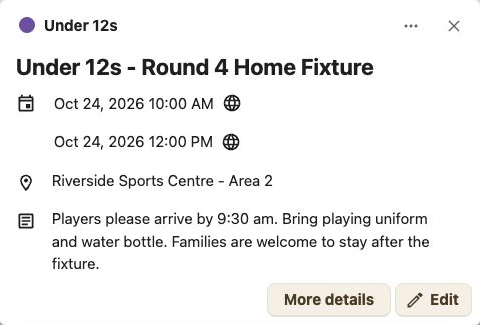
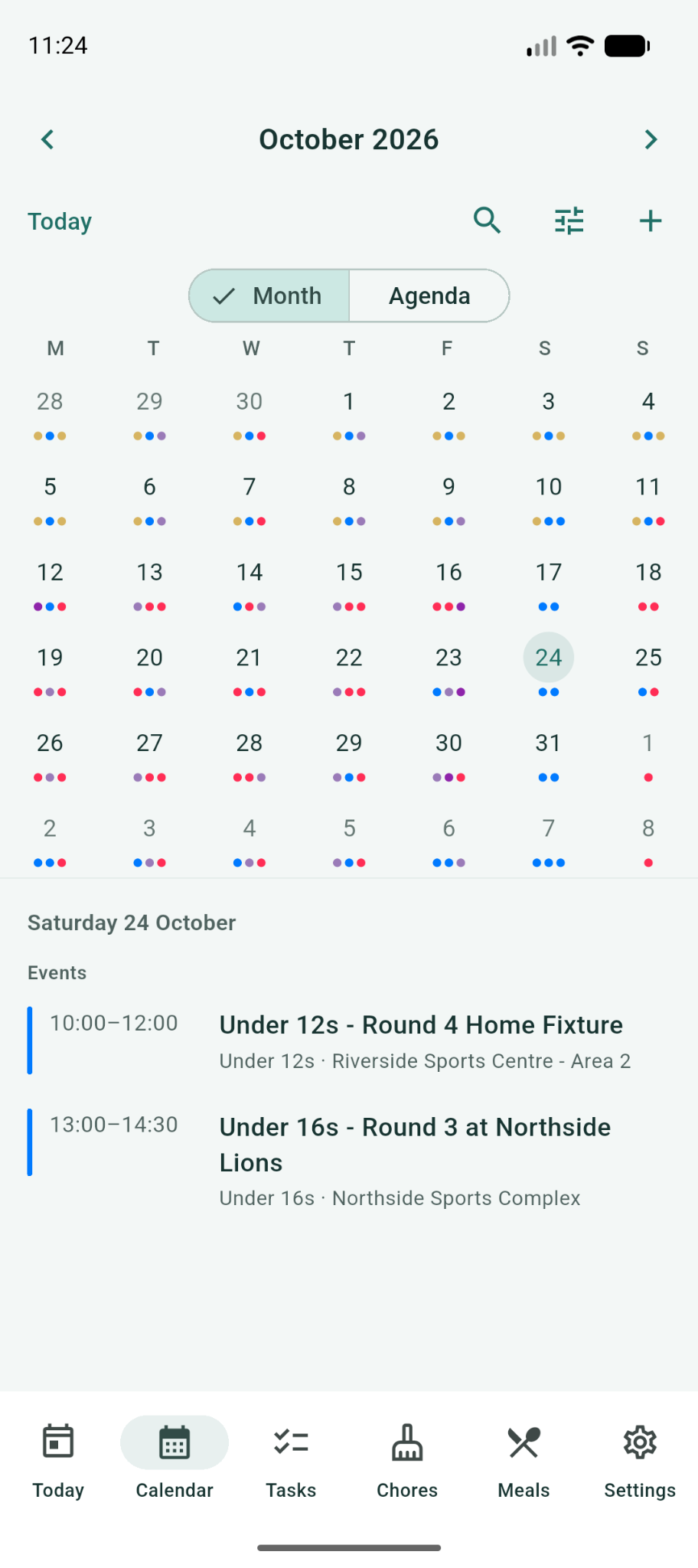
Demonstration data: a sample club and a fictional household, recorded in a Calee demonstration environment.
Publisher Free
Start free
One person in your organisation can manage up to 3 calendars in Calee, free. There’s no time limit, and the members and families following your calendars don’t count towards your plan.
- A$0. Publisher Free is a free plan, not a time-limited trial.
- 1 Business user: the person who manages your calendars.
- Up to 3 qualifying Business-owned calendars: calendars your organisation owns and manages in Calee, to publish, share and put on your website.
- Public reach isn’t metered. Followers and public calendar viewers don’t consume Business user seats.
Part of Calee Business
Calee Publisher is how organisations share their calendars with Calee, and Publisher Free is the free way to start. Publisher Free is part of Calee Business, not a separate platform or account.
Need more people or calendars? Compare Business plans.
A larger organisation, or want help setting up? Book a demo and we will start your organisation on the plan that fits.
Optional: Calee calendars
Want more people to discover your calendar?
Calee calendars is where families and members find public calendars from schools, clubs and organisations, and add them to the Calee app. When your calendar is ready, you can submit it for Calee to consider.
Publishing a calendar does not list it in Calee calendars. Listings are reviewed separately, and not every submitted calendar is listed.
- You publish and share your calendar as usual.
- When it’s ready, you submit it to Calee calendars.
- Calee reviews your organisation and the calendar.
- If Calee approves it, it’s listed, where people can find and follow it.
Questions organisations ask
Do members need a Calee account?
No, not to see your calendar. Anyone with the link can view a published calendar on the web or on your website, and people can subscribe in a compatible calendar app they already use. In the Calee app, a calendar shared through a public follow link can be added in Guest mode, up to five without an account.
Can we keep using Google Calendar, Outlook or Apple Calendar?
Yes. Supported Google, Apple iCloud and Outlook calendars can be connected to Calee as read-only calendars, so you keep editing events where you do now. You can also import a calendar file, which copies the events into Calee once without a live connection. And the people following you can add your calendar to Google Calendar, Apple Calendar or Outlook. The Calendar Guide explains each option.
Can we put the calendar on our website?
Yes, if your website supports embedded calendars. Publisher Free includes website embeds. Some website builders and hosted platforms restrict embedded calendars, so check yours before you rely on it. Your website stays yours: Calee does not replace or redesign it. The Calendar Guide shows how to add it.
What happens when a fixture or event changes?
Change it once, in the calendar where it is maintained. Your published calendar shows the new details, and people following it see the revised event when their calendar refreshes, so no one has to type it in again. How quickly that happens depends on the app and the calendar source, so keep using your usual direct channel for same-day cancellations and urgent changes.
What does Publisher Free include?
Publisher Free is A$0 for 1 Business user and up to 3 qualifying Business-owned calendars: one person managing up to 3 calendars your organisation owns in Calee. You can publish them, share them, put them on your website and submit them to Calee calendars for review. It is not a time-limited trial, and public reach isn’t metered. Need more people or calendars? Compare Business plans.
Will our calendar appear in Calee calendars?
Only once Calee approves it. Publishing or sharing a calendar doesn’t list it. Signing up does not make your organisation a Verified publisher, and it does not place a calendar in Calee calendars.
You can submit an eligible calendar for review before your organisation is verified. Calee may then ask for information about your organisation; for Australian organisations, this may include ABN details. An ABN check does not, on its own, make an organisation a Verified publisher. Calee reviews each calendar before it is listed, including calendars from a Verified publisher. Submitting a calendar does not guarantee that it will be listed, and choosing a paid plan doesn’t change these decisions.
Publish your first calendar
Sign up with an email address you verify, set up your organisation and create your first calendar. Sign-up continues securely on hub.calee.com.au.